| Purpose | This topic explains the System Settings. |
|---|---|
| Introduction | The Settings view includes various system wide settings that are used for different operational functions. |
| Sections | This topic includes the following sections: |
Search:
| Topic | Section | Sub-Section | Item |
|---|
System Settings
Topic Overview
System Settings
| Navigation |
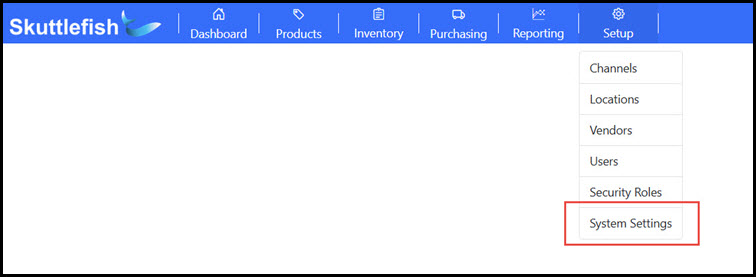
The Settings view is accessible by navigating to Setup > System Settings.
 |
|---|---|
| System Settings Fields |
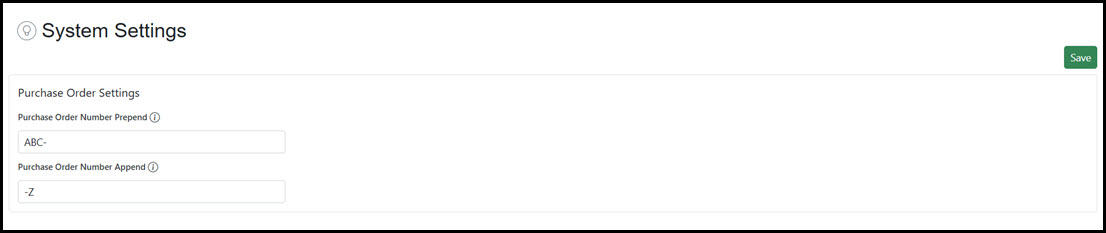
Below is an image of the System Settings view. Each field is described in the sections below.
 |
Purchase Order Settings
| Purchase Order Number Prepend | Defines a string of characters used to prefix the generated System Purchase Order Number when a new Draft Purchase Order is created. A six-digit incremental number is created for each new Draft Purchase Order. If populated, Skuttlefish adds this field to construct the full identification number. For example, if "ABC-" is set, Skuttlefish will prefix that to each incremented number (ABC-000002). |
|---|---|
| Purchase Order Number Append | Defines a string of characters used to append the generated System Purchase Order Number when a new Draft Purchase Order is created. A six-digit incremental number is created for each new Draft Purchase Order. If populated, Skuttlefish adds this field to construct the full identification number. For example, if "-Z" is set, Skuttlefish will append that to each incremented number (000002-Z). |