| Purpose | This topic explains the Adjust On Hand feature. |
|---|---|
| Introduction | Adjust On Hand is a manual adjustment to the On Hand inventory count of a product/SKU. The On Hand count can be increased or decreased to set the appropriate amount of physical product in possession. |
| Sections | This topic includes the following sections: |
Search:
| Topic | Section | Sub-Section | Item |
|---|
Adjust On Hand
Topic Overview
Adjust On Hand
| Navigation |
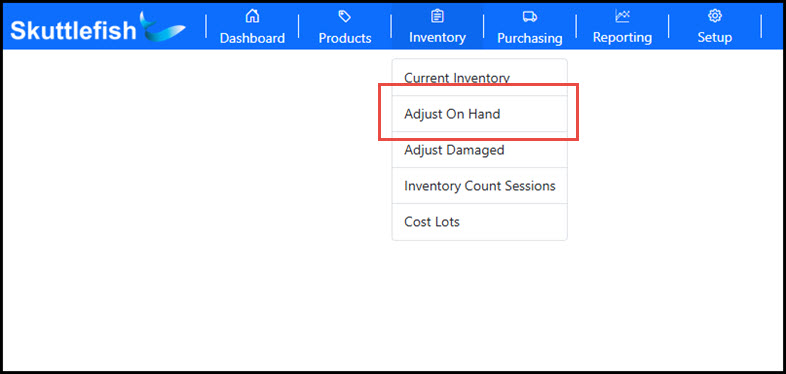
The Adjust On Hand dialog box is accessible by navigating to Inventory > Adjust On Hand.
 |
|---|---|
| Adjust On Hand Dialog |
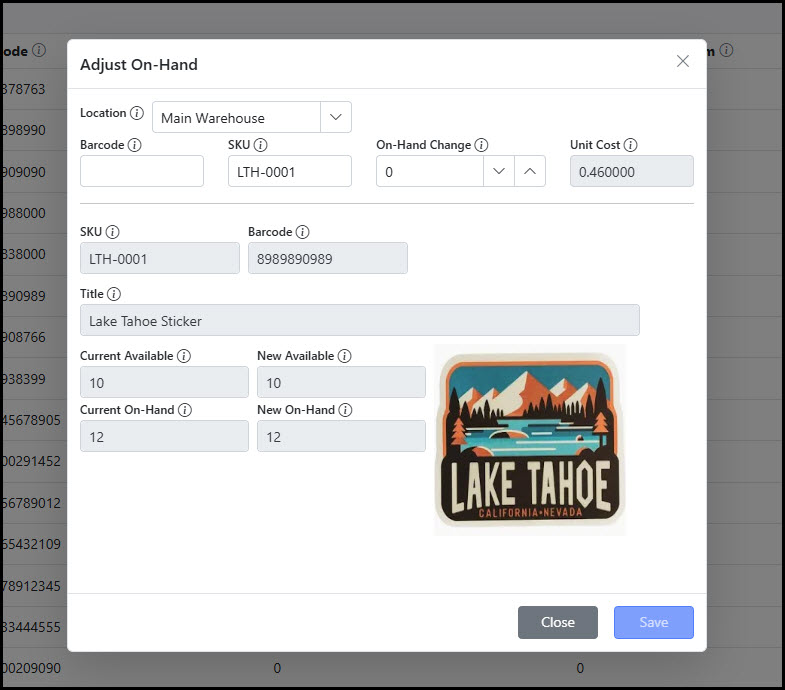
Select the Location and enter either a numeric barcode or SKU to access the SKU to adjust. Use the On-Hand Change numeric field to enter the amount to increase or decrease the On Hand amount. The New Available and New On-Hand fields will dynamically adjust to the entered amount to reflect the new amount after the change. Click Save to enter the adjustment.
 |
| Increase On Hand | Increasing the On Hand inventory count for a SKU raises the On Hand and Available inventory counts in Skuttlefish. This is then automatically synchronized to the Shopify storefront with the updated values. An adjustment increase will automatically create a new Cost Lot to mark the cost of the added quantity. The Adjust On Hand process allows users the option to add a one-time Unit Cost to the adjustment to create the Cost Lot, otherwise Skuttlefish will use the current Cost Lot that is set for the SKU. |
| Decrease On Hand | Decreasing the On Hand reduces the amount of On Hand and Available inventory counts and synchronizes with the Shopify storefront. An adjustment decrease will deplete inventory from existing Cost Lots using a First In, First Out (FIFO) method. |
Adjust On Hand - Video Overview
| Overview | The video below provides a short walkthrough of the Adjust On Hand process in the system. |
|---|