| Purpose | This topic explains how to view and manage Inventory Items. |
|---|---|
| Introduction | An Inventory Item is a record for the physical product at a specific location. The Inventory Item is also used to manage the changes that occur to counts. These changes are managed in Skuttlefish as Inventory Counts. Inventory Counts represent a running historical audit of any adjustments in counts that have occured for the Inventory Item. The user interface only shows the current state of the inventory counts, however all changes can be accessed via reporting. |
| Sections | This topic includes the following sections: |
Search:
| Topic | Section | Sub-Section | Item |
|---|
Inventory Items
Topic Overview
Inventory Items
| Navigation |
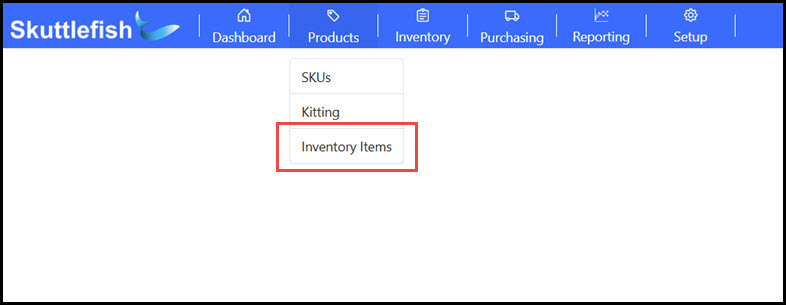
The Inventory Items Grid is accessible by navigating to Products > Inventory Items.
 |
|---|---|
| Inventory Items Grid |
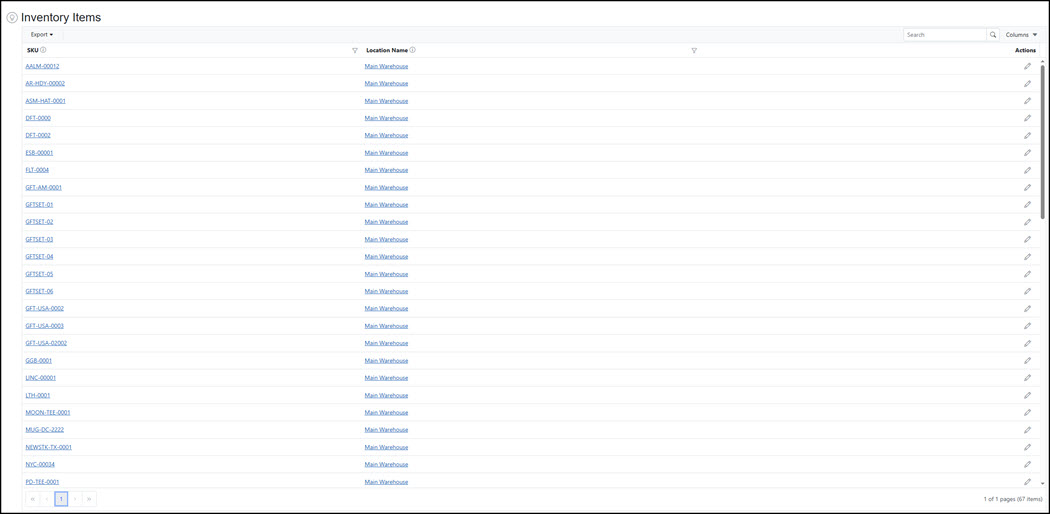
The Inventory Items Grid provides visibility and access to all inventory currently in Skuttlefish. The Inventory Items Grid allows for searching, filtering, and sorting of contents as well as the ability export to Excel or PDF file formats. Click on a row to view additional details for each item.
 |
Inventory Item View
| Inventory Item View |
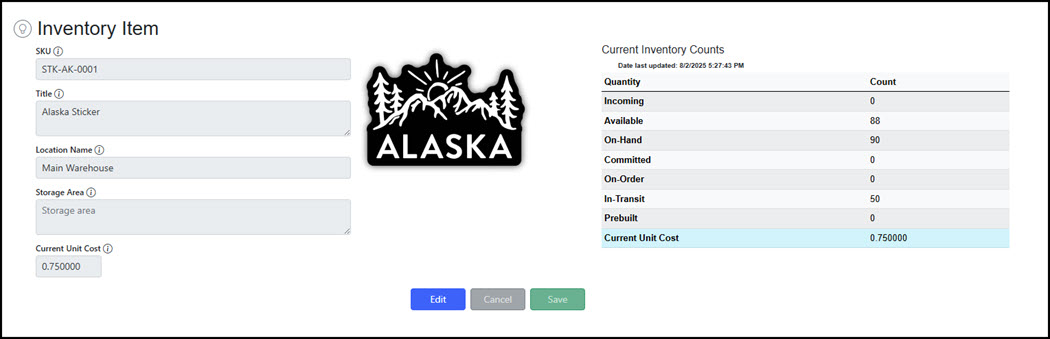
The Inventory Item View displays summarized details about a SKU managed at location. An Inventory Item shows the current count of a given SKU available at a specific location in the Current Inventory Counts table.
 |
|---|
Inventory Counts
| Description | Skuttlefish tracks all adjustments to Inventory Item product counts. Any change to product counts is tracked by the Inventory Counts in order to provide an up to date state of the inventory and a robust archive of changes that have impacted the product. Counts may be impacted by orders, adjustments, damaged product, purchase orders, quality assurance, and other circumstances. Some common examples are illustrated below to describe how Inventory Counts track some inventory changes. |
|---|
Shopify Orders
| Shopify Order Creation |
A simple Inventory Count record for a SKU can resemble the image below. There are 100 items On Hand and Available for product STK-CA-0001.
 |
|---|---|
| Shopify Order Creation |
The Shopify order is created in an "Unfulfilled" status. In this example, 20 of the STK-CA-0001 product are purchased as part of an order. The count is moved from Available to Commited for the Inventory Item.
 |
| Shopify Order Fulfillment |
Once the order is fulfilled in Shopify, Skuttlefish updates the counts and creates a new Inventory Count record. In this case, the fulfillment results in the Committed amount from the order returned to zero and the On Hand amount of the ordered item decremented by the amount that was sold.
 |
Purchase Orders
| Description | The Skuttlefish Purchase Order Management process includes a number of exception processing steps that track shipments from vendors through receiving and quality assurance. This process is explained in more detail in the Purchase Order sections of the help documentation. To illustrate how Inventory Counts manage the replenishment of supply via Purchase Orders, below is a simple purchase ordering process and how Inventory Counts are impacted. |
|---|---|
| Submit Purchase Order |
Inventory Count records are created as adjustments occur during the purchase order workflow in Skuttlefish. When a Draft Purchase Order is submitted, a new Inventory Count record is created for each item in the purchase order. In the image below, a Purchase Order has been submitted that includes 50 of the STK-CA-0001 product.
 |
| In-Transit Purchase Order |
An Inventory Count record is produced when the shipment for the Purchase Order's product is marked as "In-Transit". This count is tracked in the Inventory Count In-Transit bucket.
 |
| Shipment Receiving - Partial Delivery |
Skuttlefish can track multiple shipment deliveries for a single purchase order. Reception of purchase order item quantities in a shipment is reflected in the Inventory Count.
The Inventory Count shown below reflects 25 of the 50 expected count of the STK-CA-0001 product has been received in a shipment. The received 25 is reflected in the Quality Control bucket - identifying these as reiceived and ready for review by the quality assurance team. The remaining 25 are tracked in the In-Transit bucket of the Inventory Count.
 |
| Shipment Receiving - Quality Control |
Purchase Order shipments move through the Quality Control process into an "Accepted" or "Damaged" status before being moved to a final approval stage. Once approved, Accepted counts are moved to the On Hand/Available inventory while Damaged counts are assigned to Damaged and the Quality Control amount is reduced. These adjustements are shown in a new Inventory Count record. Below, all 50 have been quality assurance reviewed, approved, and moved into the On Hand/Available buckets increasing the total amounts.
 |
Adjustments
| Adjust On Hand & Adjust Damaged | The Adjust On Hand and Adjust Damaged features allow the increase and decrease of On Hand/Available inventory for each SKU. These actions also create new Inventory Count records when the SKU counts are adjusted. Adjust On Hand allows increases or decreases to On Hand inventory while Adjust Damaged only reduces On Hand inventory counts caused by damaged/distressed product. Both use the Inventory Count records to track and archive any changes made to a product. |
|---|